


How to create and optimize your backups
To create a backup, please go to the Backups tab on your server.
However, it is important to optimize your backups so that only important files are kept.
To do this, you must enter what should be excluded in the “Ignored Files & Directories” box.
If this is not done, the entire server will be backed up and will quickly use up your allocated space.
To optimize your backups, first locate the savegame files or any other important files related to this.
Note: check the knowledge base for the game in question to see if these are mentioned. If not, please let us know.
Once you have found them, indicate any files or directories to be ignored.
You can also use negation with “!” to force NOT to ignore this file.
Here are a few examples:
If you enter “/*” - This indicates that you do not want to keep any files or folders.
If you then enter, for example, “!/folder/folder/file.extension” - This indicates that you do not want to keep anything except the file mentioned.
Each file and/or folder must be on a separate line.
If we take the following example with "Don't Starve Together" game, I keep nothing except the cluster.ini file.
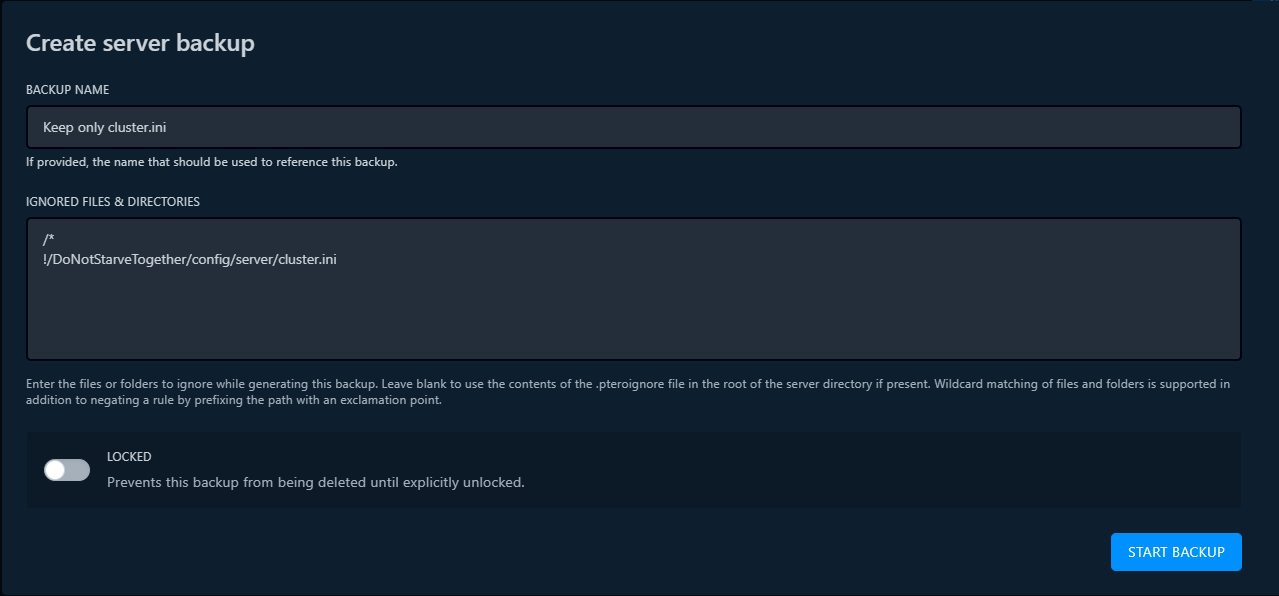
The backup will only contain the folders leading to the file and the cluster.ini file itself.
/* IMPORTANT *\
If you perform backups with automatic schedules, it is important to optimize your backups as much as possible to avoid running out of disk space.